Report #: Quick View
Purpose: The sales opportunity review allows users to conduct a review of all sales opportunities, historical and active, depending on the filters used. This report is often used to review deals that were sold or lost for a particular reason, as well as to check to make sure active sales opportunities are accurately being maintained and tracked.
Filters:
- Company: This is an internal list of companies/entities
- Branch: Internal branch(s) for which you would like to report opps
- Dept: Your internal department(s) for which you would like to report opps
- Status: Opportunity Status – Prospecting, Pending, Pending Approval, or Signature Required
- Won/Lost: Reason for Loss or Win
- Win Status: Did this sales opp become a sale? Won or Lost
- Interest: Type of opportunity i.e. Equipment, Design, Simple, Complex
- Sales Rep: Sales Representative
- Time Period: i.e. Previous Week, Month, Past 60 Days…
- Start Date: Date will update according to the above period selection, or may be manually set for a different period
- End Date: Date will update according to the above period selection, or may be manually set for a different period
- Date Filter: Filter by Close Date or Won/Lost Date
Report Results:
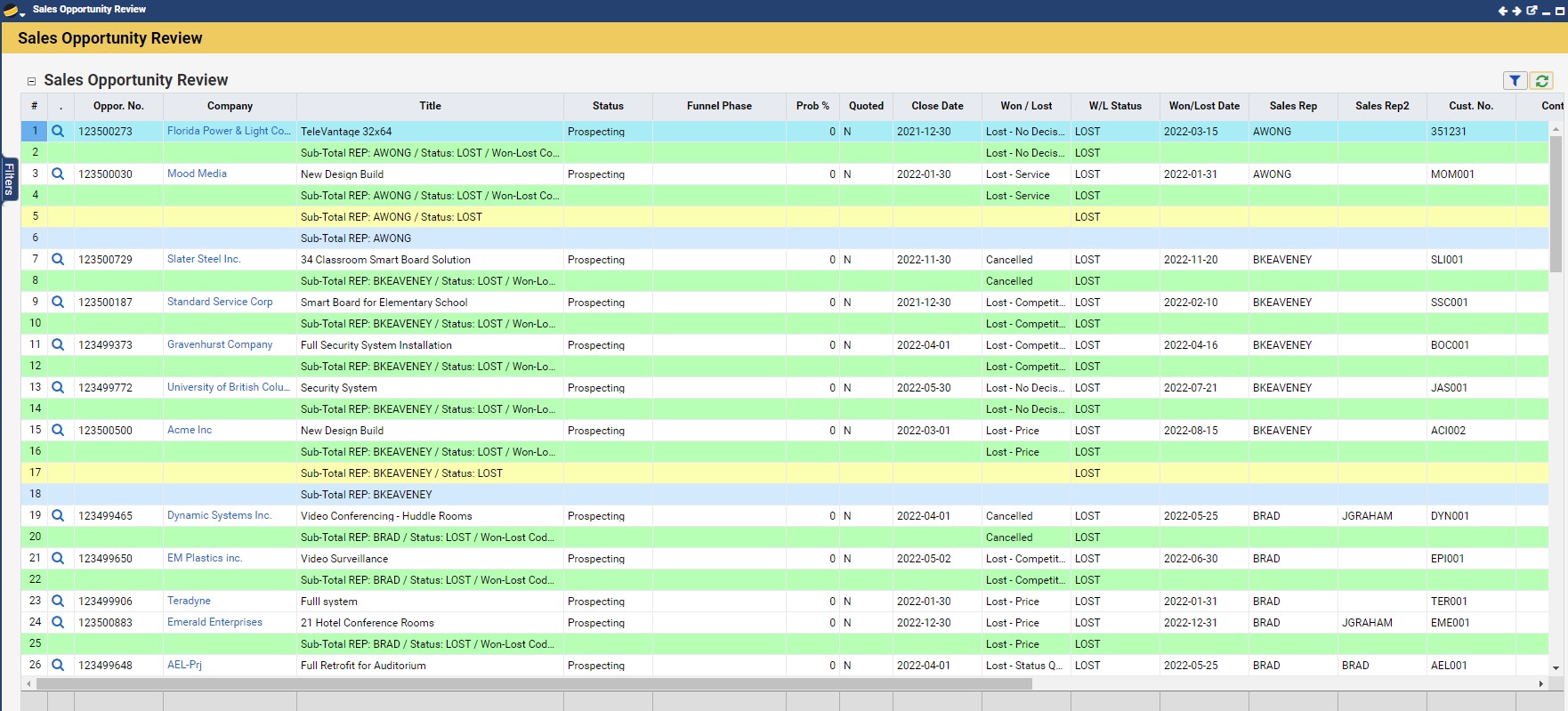
- One row per sales opportunity.
- With a subtotal per sales rep by won-lost code
- With a total per sales rep
- In the footer, there is a total sales opp and converted quote value for the returned records
- Grouped by sales rep
- Zoom/Drill-in/Link: This will drill down into the sales opportunity
- The columns returned in the report are:
- No: This is the sales opportunity number
- Company: This is the prospect/customer names
- Title: This is the sales opportunity title
- Status: This is the sales opportunity status
- Funnel Phase: This is the current completed funnel phase the sales opportunity is in
- Prob %: This is the probability of closing percentage for the sales opportunity
- Quoted: This is a yes or no value indicated if a quote exists or not
- Close Date: This is the forecasted date the sales opportunity will close/sell
- Won / Lost: This is the value of the win or loss of the deal if you are filtering on completed sales opportunities based on your filter selection of the same name
- W/L Status: This is the status of the opportunity; active, won or lost
- Won/Lost Date: This is the date set along side of the win/lost value
- Sales Rep: Sales Rep for the opportunity
- Sales Rep 2: Second Sales Rep (if any) for the opportunity
- No.: Customer number of the prospect or customer record of the sales opportunity
- Contact: The main contact of the sales opportunity
- Last Contact: This is the date of the last time something was done on the sales opportunity
- Opp Value: This is the value of the sales opportunity
- Quote Val: If there is a quote that was sold as part of this opportunity its value will be shown here
- Branch: This is your internal branch name to which the sales opp is linked
- Department: This is your internal branch name to which the sales opp is linked
- Add Date: This is the date the sales opp was created
- Aging: This is the difference in days between today’s date and the sales opp add date
- Duration: This is the difference in days between today’s date and the Won/Lost Date
For more information on other useful reports, check out our Sales and Operations Reports Webinar.