Introduction
The Cash Flow Forecast live data report provides visibility into the current and future cash position of your company by leveraging the information within Q360 as it pertains to bank account balances and expected receivables and payables over a given period.
Business Challenge
Businesses often rely on a manual cash forecasting process that requires data entry and manipulation of information within spreadsheets to produce an accurate representation of a company’s cash position. This method can be time consuming and with it come additional risks of inaccurate or out of date information.
Key Takeaways
Q360 allows you to accurately forecast your cash position by leveraging real time data and allowing you to model how that cash position might change given various circumstances. To get the most out your Q360 cash flow forecast,
- Set expected payment dates for receivables and payables
- Use invoice tasks and material request dates to accurately forecast project invoices and expenses
- Properly configure recurring service contract invoicing
- Identify and flag general ledger accounts that contain fixed costs to develop an overhead expense estimate
- Adjust filters on the report to model “what if” scenarios
In Q360
The Cash Flow Forecast report consists of various filters to give you flexibility over your cash projection and contains the following filtering options.
Company
- If you have a multi-company setup in Q360, select “ALL” to view the report for all of the companies.
- Select a company name to run the projection for a single company
Branch
- Leave blank displays all branches
- Select a branch name to display the impact that a single branch has on cashflow
# of Periods
- Options are 6, 12, 18, and 24. These are the number of periods to forecast.
- The more periods selected, the longer the report may take to generate
Time Unit
- WEEK – Report runs in weeks for the selected number chosen in # of Periods.
- MONTH – Report runs in months for the selected number chosen in # of Periods.
Inc. Proj. Invoices
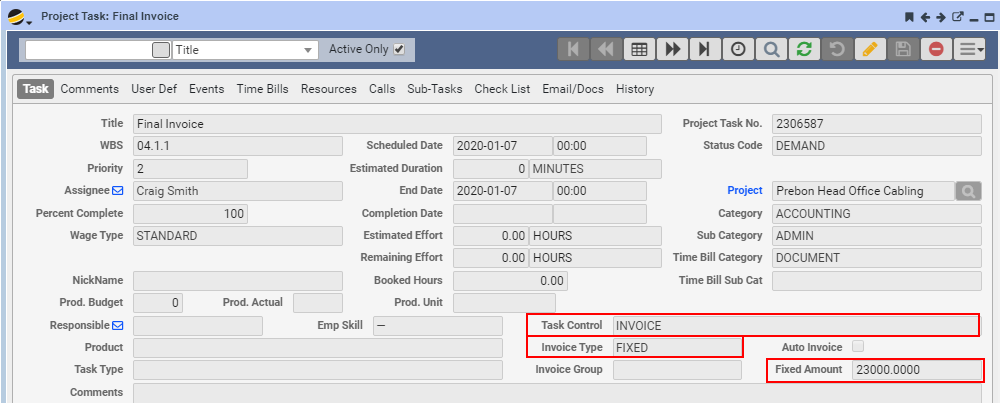
- YES – Includes Uninvoiced Projects, projecting cash receipt based on either the customers payment terms or the customer’s average payment days.
- Projects must have tasks with Task Control field set to INVOICE, with a proper scheduled date. The task must have either a fixed amount or percentage depending on the option specified in the Task Invoice Type field.
Inc. Proj. Cost
- YES – Includes unrecognized project costs, based on the Request Date of Project line items as set in the Materials tab in the Project form. This forecasts costs for A, Q, M, and S type items. Labor is not included in these costs.
Inc. S.C. Invoices
- YES – Includes un-invoiced service contracts
Base Currency
- Set to ALL. This is reserved for future use.
Age By
- Due Date – Calculates that invoices will be collected based on the due date
- AVG Pay Days – Calculates that invoices will be collected based on the customer’s average pay days
Periods to Collect
- The number of periods that overdue invoices will be collected over. For example, if there is $120,000 in overdue invoices, entering 12 in this would result in 1/12 of each customer’s overdue balance being collected in each period. $10,000 would be collected over a given period. This would be reflected in each customer’s forecasted collections for each period. A larger number is a more conservative estimate of collections.
Fixed Periods to Avg
- The number of previous periods used to calculate overhead based on fixed cost GL accounts. Any GL account with the “Fixed Cost” flag set will be used to calculate the amount shown in the Overhead row of the report.
- If left blank, the last 3 periods will be used.
Fixed Adjustment %
- Applies an adjustment to the reports Overhead amount. This is calculated by multiplying the calculated fixed costs (as determined by the “Fixed Periods to Avg”) by this percentage and allows you to model what effect a reduction or increase in fixed costs would have to your cash forecast.
Published: April 15, 2020
Assumes: Q360 version 10.01.008 and later