Introduction
Labor is a finite resource that in generally estimated with higher margin than materials and equipment. As such, it is critical to optimize labor setup to enable accurate forecasting and execution of profitable jobs.
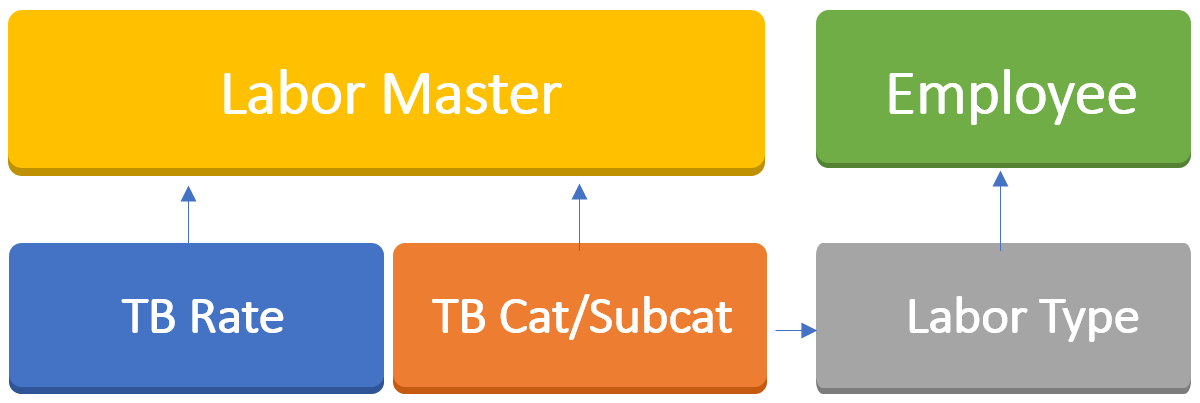
There are four main components to setup labor in Q360:
- Labor masters
- Labor masters are cost codes that you estimate and sell, and carry average loaded cost and selling prices.
- Time billing (TB) categories and subcategories
- Time billing categories and subcategories allows individuals to record type of effort being put into a job.
- Labor rates
- Labor rates connect time billing categories, subcategories, and labor masters. It further allows you to set minimum hours and rounding rules for the purpose of automating service billing.
- Labor type
- Labor type is an attribute of an employee and connects it to the time billing category, which is required for labor forecasting. Each employee should be setup with a labor type.
Labor is tracked in Q360 in the following areas:
- Projects and project pre-sales
- Service
- Internal Admin
Project and Project Pre-sales
Projects are generally complex, longer duration, and requires multiple different resources to contribute to the project. Projects also go through several different phases. A single resource may contribute to the project at different phases, potentially doing different type of work. Thus, it is important to determine all the different phases and types of work that the project will go through. This helps to determine your estimation process as well as your project work breakdown structure (WBS).
The examples demonstrate the types of work and time billing categorization:
| Labor Master |
Time Bill Category |
Description |
| PROJMGMT | PROJMGMT | Project Management |
| ENGINEERING | ENGINEERING | Engineering |
| PROGRAM | PROGRAM | Programming |
| CAD | CAD | CAD Drawing |
| INSTALL-PREWIRE | INSTALL-PREWIRE | Installation Prewire |
| INSTALL-TRIM | INSTALL-TRIM | Installation Trim |
| INSTALL-FINISH | INSTALL-FINISH | Installation Finish |
| COMMISSIONING | COMMISSIONING | Commissioning |
| RACKBUILD | RACKBUILD | Rack Build |
| TRAINING | TRAINING | Training |
The above is an example of labor and phase the project would normally go through. These same labor codes will also be used as part of your project estimation. When project is awarded, the Project Manager will have a budget for each labor/phase code must be managed to complete the project.
Service
Labor on a service call is entered to track all the time spent in addressing the service call. Time billing categories here are generalized. Examples include the following:
| Labor Master |
Time Bill Cetegory |
Description | Min. | Rounding |
| SERVICE | SERVICE | Service Labor | 1 | 0.5 |
| EMRGSERVICE | EMRSERVICE | Emergency Service | 1 | 0.5 |
| TRAVEL | TRAVEL | Travel | 0 | 0 |
Minimum hours and rounding setup on the labor rates plays an important role in service call billing rules. It will determine the overall time booked against the service call and assess the minimum hours and necessary rounding to generate an invoice.
Travel Time
Travel is a necessity on all projects and for the majority of service calls.
- Travel for projects
- Travel time (especially extended travel) should be estimated based on the scope of the project and the number of trips that will be required. While the goal of this estimate is not to be completely accurate, it is important to budget for travel as this is a real cost to a project.
- Travel for service
- For service related work, it is important to track travel time separately then the actual onsite work. This allows you to better analyze the “wheel” time (non-productive) type work, and helps to determine better scheduling and dispatching strategies.
Internal Admin
Admin time refers to time recorded that is not attributable to a customer job such as projects, calls, and pre-sales opportunities, and is therefore not chargeable.
In Q360, admin time is typically booked using time bills against a year-round admin project, with a task assigned to each employee for booking such time. In certain cases, special internal projects can be created for admin time related to specific internal projects, such as training.
Examples of additional setup to this type of labor tracking include the following:
| Labor Master |
Time Bill Category |
Time Bill Subcategory |
| MISC-LABOR | ADMIN | |
| MISC-LABOR | ADMIN | PTO |
| MISC-LABOR | ADMIN | HOLIDAY |
| MISC-LABOR | ADMIN | SICK |
| MISC-LABOR | ADMIN | BEAREAVEMENT |
| MISC-LABOR | ADMIN | JURY DUTY |
Labor Types
Labor types are somewhat consistent across different companies that use Q360, and aim to abstract the pool of time billing categories into a higher-level types and tie those types to employees capable of performing such types of work. As a result, Q360 will have the information to report on current and future labor capacity.
To achieve this, use the following guidelines:
- Review your global list of labor types from Q360 general codes.
- Ensure each employee has labor type designation filled out in their employee profile. You can also fill this in the employee’s load sheet.
- Ensure each employee has their available hours filled in their employee profile. You can ask your Q360 implementation team to set those hours across multiple employees at once.
- Ensure each time bill category has an associated labor type in Q360 general codes. Focus on time bill categories where forecasting and capacity planning is required.
Once setup is complete, implement the following process:
- Project managers schedule high-level project tasks in advance and assign them to team members through sub-tasks
- Projects tasks and sub-tasks carry effort (hours) estimation
- Service dispatchers schedule service calls
With setup completed and procedures followed, you can take advantage of Q360 Labor Capacity Forecast live data report.
Frequently Asked Questions
What if we don’t want to display our labor estimate on our proposals?
This is fine. Your proposals can be designed to suppress all labor items into a single line. However, it is important to estimate by different labor/phase codes to provide a realistic labor budget to the Project Manager.
Published: May 17, 2021