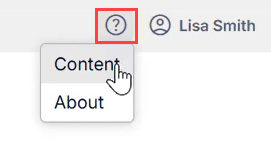
The Help Menu in Q360 contains two options and is identified by the ‘?’ icon and is located to the left of your User Name.
- Content: selecting this option will direct you to the Q360 Online Help Center where you will find Core Procedures (basic instructions for core Q360 functions), Knowledge Base Articles (this content details more complex topics or forms), Videos, and Release Notes / Advisories for each Q360 version.
- About: selecting this option will display version information for the currently running version of Q360