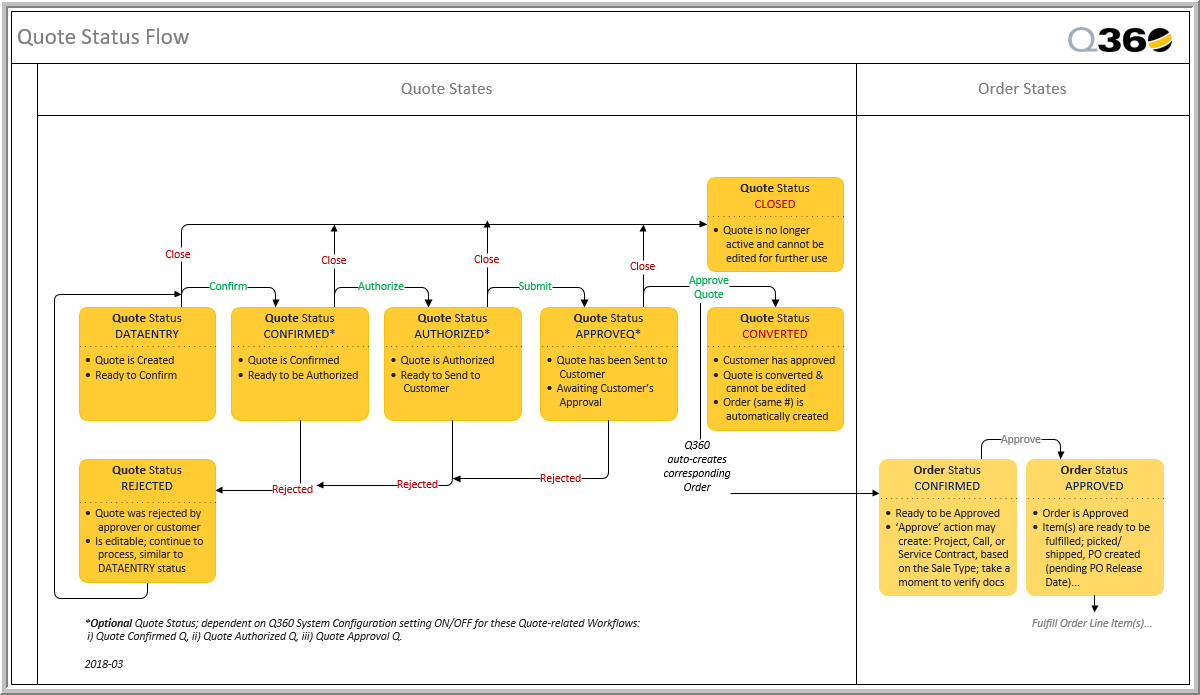
This section describes how to create a Quote from an Opportunity and how to process the Quote
Create a Quote for an Opportunity
- Open a Sales Opportunity
- Click the Quotes tab, then click the Quotes grid Add icon. The new Quote contains details carried over from the Opportunity. From here you can add other necessary information.
- Pay particular attention to the Sale Type field. This selection will determine whether a Project, Service Contract or Service Call will be created
- Note: Quote Header tab contains the field GP / Hr – this field displays Gross Profit per hour and is calculated as [Total GP (Gross Profit) divided by Total Hours]
- On the Line Items tab, add some Line Items or Quick Lists as needed (using the Find Product Sub Tab). These are detailed in additional Quote Procedures.
- Click the Save icon
For more information on building Quote Line Items, see Build Quote Sections and Build Quote Line Items
Process a quote
- Open a Quote you want to send for approval
- Click the Process icon, then click the Confirm Quote button. This changes the Status of the Quote from DATAENTRY to CONFIRMED
- The Quote will be sent through the AUTHORIZED, SUBMITTED, and APPROVED process, as illustrated on this Q360 Quote Status Flow