This topic introduces concepts related to taxation in Q360.
Note: The decisions you make from this paper are reflected in your Tax Codes document in the Core Setup workbook, as well taxation flags on masters listed in your Master Import workbook.
Tax accrual
Q360 uses the accrual method of accounting. Therefore, tax liability is recorded when an invoice is posted, but not necessarily paid. Similarly, tax expense or accrual is recorded when a voucher (vendor invoice) is posted but not necessarily paid.
GL accounts
By default, Q360 uses two key GL accounts defined at the Entity level. The Sales Tax Collected liability account, and the Sales Paid Tax expense account. Through supplemental reports, you can obtain details of transactions on each account, including which tax district each transaction was recorded under. For more information, refer to the Account Lookup Rules document for more information on options for overriding these two default accounts.
Types of taxation
Q360 supports the following types of taxation:
- Sales tax collected from customers
- Use tax that is internally costed and is applicable to US jurisdictions
- Tax exemptions
A customer job can be classified with only one of the above types. Payments to vendors can be taxed or exempt on a case by case basis.
Triggers
The following actions trigger Q360 to record taxes:
| Trigger | Type of Taxation | Entry Type | GL Account |
| Invoice posting | Sales Tax (collected) | Liability | Tax Collection account |
| Voucher posting | Sales Tax (paid) | Expense | Tax Paid account |
| Invoice posting | Use Tax (costed) | Expense | COGS account |
Tax exemption
No tax will be recorded on an invoice or voucher that has an exemption tax code. Exemption rules can be defined at high level, such as company (customer or vendor), and inherited (or overridden) on a lower level, such as opportunity, quote, order, or invoice. It is recommended that you verify the correct tax code is used before booking any jobs in Q360.
You can also track other tax exemption information, such as exemption number and reason, at the company level.
Basic tax configuration
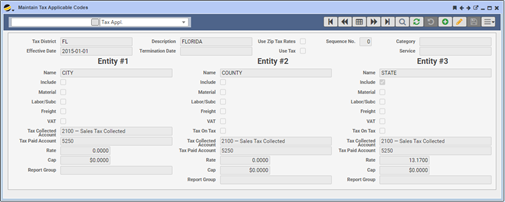
Q360 uses tax applicable codes to control taxation on jobs. A tax applicable codes is a tag that is set on a company level (customer, vendor or even site) and is inherited but overridable, on jobs related to the customer or POs related to the vendor.
Each tax code is marked as either Sales or Use tax. And each can tax up to three levels, which are typically defined as City, County and State. These labels can vary at the individual code level depending on your taxation requirements.
In each of the three levels within a tax code, you can specify a rate of %0 or more. Other controls you have at each level include taxing or exempting materials, labor and subcontractors, and freight.
Advanced tax configuration
Managing Exceptions on Masters
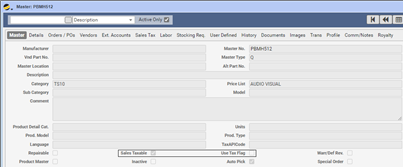
Each master in Q360 can be flagged for inclusion or exclusion from the job’s applicable tax code. When unchecked, Q360 will never calculate taxes for master, irrespective of the tax code specified for the job.
 If using applicable tax codes is insufficient for your taxation requirements, Q360 supports the following additional methods:
Zip Code Based (self-managed)
Taxation based on zip code. This requires loading information into a lookup table.
Tax Service Integration using AvaTax or CCH SureTax
Taxation based on integration with a 3rd party service. This requires a subscription to one of the supported services.
Tax reporting
When using taxation features of Q360, you can report on taxes using two key reports:
- Tax Report: Provides a summary for taxes accrued in a given period of time. Can be optionally filtered to one or more tax codes, state, or county.
- Sales Tax Detail: Provides invoice-level details of accrued taxes
Relieving tax liability
To relieve tax liability account, it is recommended that you record the payment through a manually created voucher that is linked to the liability account. You can also record manual journal entries to relieve your tax collection account.