How to Automatically Expire Service Contracts in Q360
This guide explains how to configure service contracts in Q360 to automatically transition to an “Expired” status after a specified period of inactivity. By following these steps, you can ensure that inactive contracts are appropriately managed without manual intervention.
Step 1: Define Inactive Contract Settings
First, you need to specify how long Q360 should wait after a Contract’s end date before marking it as expired
- Navigate to Accounting > Admin > Company Setup
- If you have multiple Companies, repeat steps 3 and 4 for each
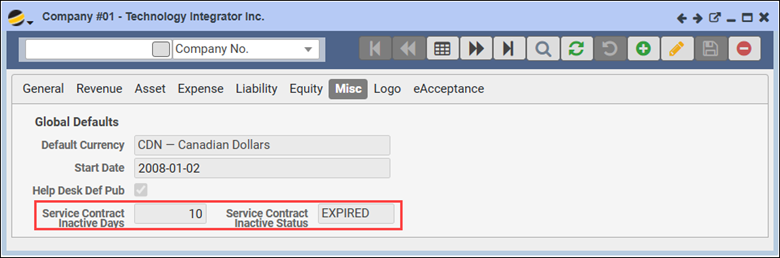
- Select a Company and go to the Misc tab
- Set the Service Contract Inactive Days to a value greater than 0 (zero) (zero indicates the feature is OFF)
- Service Contract Inactive Days: This number defines how many days past the Contract’s End Date Q360 will wait before setting it to the status specified in the Service Contract Inactive Status field
- Service Contract Inactive Status: Choose a Status such as “Expired” that will automatically apply once the inactive days have passed
Note: We recommend setting this value between 3 and 10 days. Setting it to 1 day might be too quick, as contracts could expire before any grace period is provided.
Step 2: Verify Background Job Setup
If your environment already has the “Resq Daily” background job set up, this will automatically enforce the expiration process based on the settings from Step 1. Here’s how to check if it’s configured:
- Go to Maintenance > Background Administration
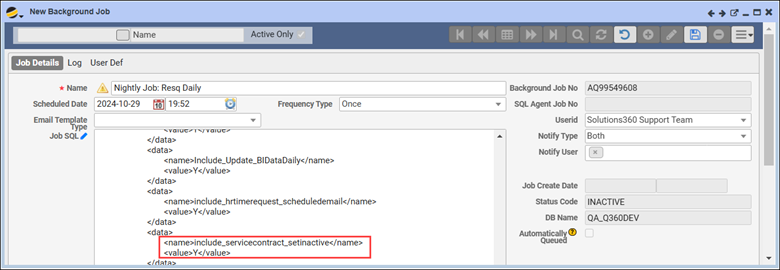
- Search for Nightly Job: Resq Daily
- In the job details, confirm that “include_servicecontract_setinactive” is set to “Y.” This setting allows Q360 to check and update the Service Contract status based on the Service Contract Inactive Days and Inactive Status fields
If the Service Contract Inactive Days is currently set to 0 (zero), the system will not expire contracts automatically. Updating this value will enable the expiration function.
Following these steps will help you automate the expiration process for Service Contracts in Q360, ensuring they transition smoothly to an inactive state after the specified period.