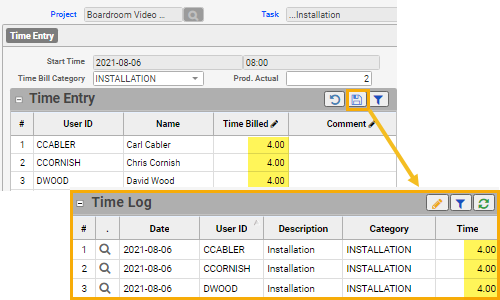
Easily add timebill records with one click for multiple project team members who work on same Project and Task, with same start time, timebill category and subcategory.
- Go to Projects > Project Team Time Entry.
- Fill in the details for the timebill:
- Start date/time
- Project and associated Task
- Notice the Timebill category/subcategory, wage type are pre-filled based on the settings for the Task (if defined)
- Otherwise, you may edit.
- For each applicable team member in the Time Entry grid, enter the corresponding “Time Billed” value (in hours) directly in the cell.
- Click Save icon.
- Hint: To view how many hours of timebill are in the system related to the team member or task (and the potential gap of time left to be added), refer to:
a) Time Entry grid > “Already Entered Today” column: displays sum of timebill for the “Start” date selection
b) Time Log tab: grid displays all the timebill records linked to the selected Project/Task combination
- Hint: To view how many hours of timebill are in the system related to the team member or task (and the potential gap of time left to be added), refer to: