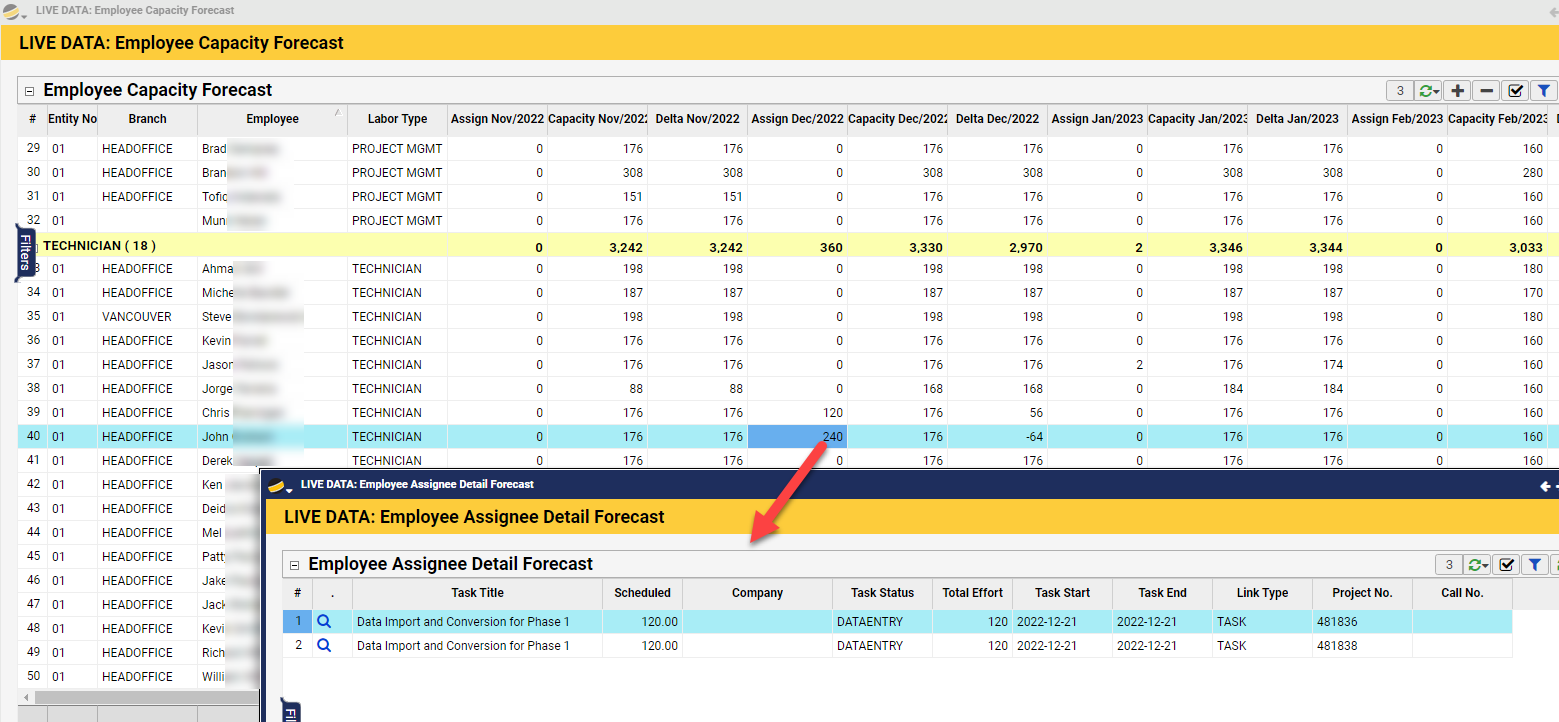
Employee Capacity Forecast
Report #: Q0336
This reports allows the user to see each individual employee’s capacity, based on available hours and the hours of work currently assigned to each. It also allows the user to drill down into the details of the work assigned.
Path: Live Data > Accounting > Employee Capacity Forecast
Key Data Used:
- Project Task Assignments
- Dispatch / Call schedule
- Employee Schedule Information
The “Assign Period” columns show hours, based on the total hours of Assigned work over that particular period (month or week). Assigned work is calculated based on Assignments on Tasks and Scheduled Service Calls.
The “Capacity Period” columns show hours available to work, based on the information found on the HR > Employee > Schedule Tab. These columns are calculated by taking the number of hours between the Employee’s “Default Start Time” and “Default End Time,” and subtracting the “Non-Available Hours” found on the HR > Employee > Details tab. This value is then multiplied by the number of working days selected on the Schedule Tab. Capacity is then reduced by any additional time off detailed in the HR > Employee > Schedule Tab > Schedule grid.
The “Delta Period” columns show the excess capacity for the Employee based on the two fields detailed above.