Overview
Service Rates allow Q360 users to configure and apply specific discounts to Services, based on criteria such as Call Type, Category, and Items used. This customization helps streamline pricing for Service Contracts and Service Calls, ensuring that applicable discounts are consistently applied.
Service Rates provide flexibility in defining discounts and applying them across various Services. By setting up Service Rates, users can control discount levels for Service categories and apply them automatically to Service Contracts.
Service Rates Setup
- Navigate to Service Rate Administration
- Go to Accounting > Admin > Service Admin > Service Rate Administration
- Add a New Service Rate
- Click the ADD (+) button to create a new Service Rate
- Fill in the Details
- Title: Enter a Title for the Service Rate
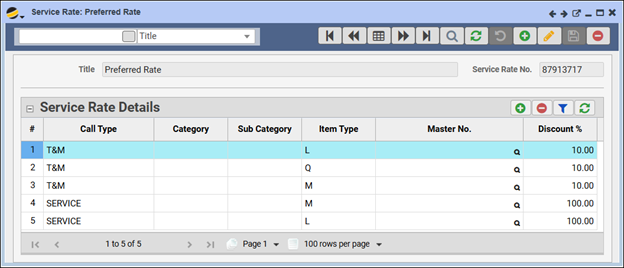
- Conditions: Define the conditions that will trigger this Rate. Options include:
- Call Type: Specify if the Rate should apply to a particular type of Service Call
- Category, Subcategory, Master No., Item Type: Refine the Service Rate by selecting any combination of these fields to be as specific as needed
-
- Example: You could apply the Rate to a Specific Call Type and Category, or target only a particular Master item
- Note: Leaving some fields blank will apply the Service Rate more broadly
-
- Select the Discount Percentage
- Enter the Discount Percentage (e.g., 10%) that will be applied when this Service Rate is used
- Configure Service Rate Details
- In the Service Rate Details grid, click the ADD (+) button to add specific discount details
- You can add multiple rows as needed to fully define the Rate’s scope
- Save the Service Rate
- Click SAVE to complete the setup
Service Rates Use
- Assigning a Service Rate on a Service Contract
- Open a new or existing Service Contract
- Ensure there is a Product listed under the Line Items tab that can be used to create a Service Call
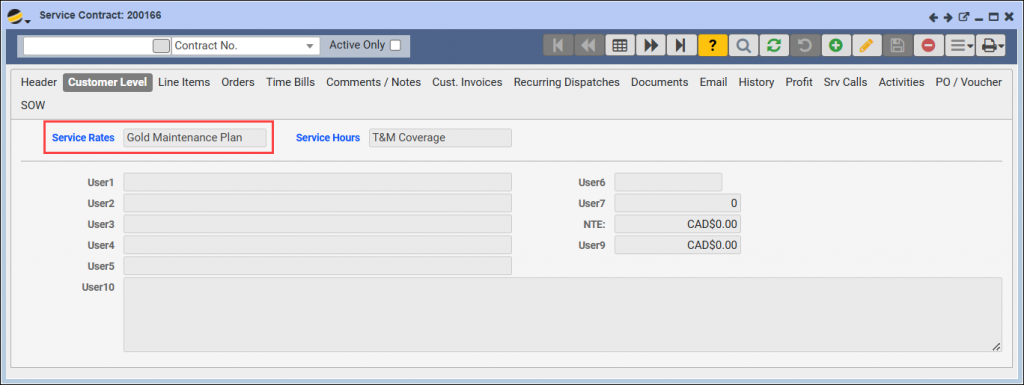
- In Edit mode, navigate to the Customer Level tab
- Click on the Service Rates dropdown and select the appropriate Service Rate for this contract
- Effect of Service Rates
- Depending on the setup, the Service Rate can affect:
-
- Time Bills: Any time billed may reflect the configured Discount Percentage
- Parts Tab Items: Items added to the Parts tab may also receive the discount as per the Service Rate settings
-
- Depending on the setup, the Service Rate can affect:
Quick Tips
- Specificity: Service Rates can be as broad or specific as needed. Use the conditions to control when and where the discount applies
- Automatic Application: Once configured and assigned, the discount automatically applies to relevant time bills and items added, ensuring consistency
The Service Rates feature makes it easy to control Service pricing across different types of Calls, Categories, and Items, simplifying billing for both Users and Customers.