See what’s new in Q360 version 21.01
Watch the highlight reel
Watch the full webinar
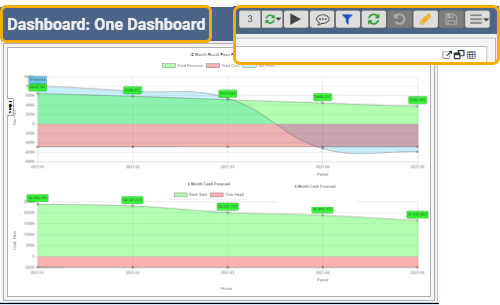
Introducing the “One Dashboard” consisting of two stacked line graphs to visualize Break Even Analysis and Cash Flow Forecast reports.
Other reporting enhancements include additional data sources for reporting data, and dashboard features including options to filter data, add visual goal threshold, hide label, maximize, and play “on a loop”.

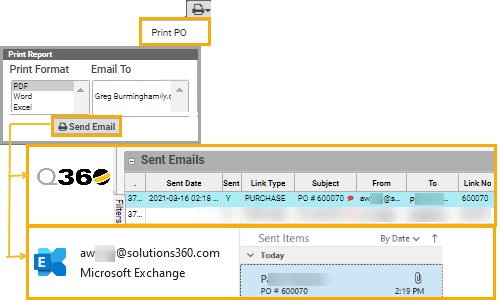
Ability to see sent email in your mail application, e.g. when sending an email from a Q360 Purchase Order record.
Other enhancements include improved email sender experience, enhanced email editor including user preference email signature, and easy inserting of saved text from Q360 Global Comments.
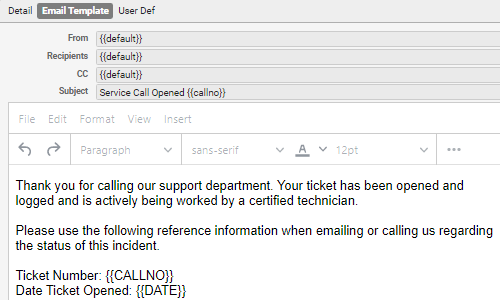
Applies to various forms and print templates. You can configure the default Q360 automated email subject and body text – e.g. on open a Service Call. Option to edit a default configuration, or create ‘new email template’ associated with specific conditions for customerno, siteno, companyno, branch, or department.
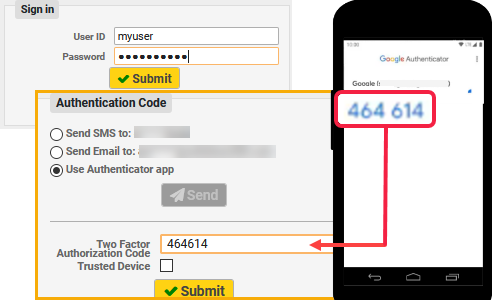
Support of two-factor authentication (2FA) method time-based one time password (TOTP), for added web client login security. This incorporates trusted third party authentication apps such as Google Authenticator, Microsoft Authenticator, and Authy.
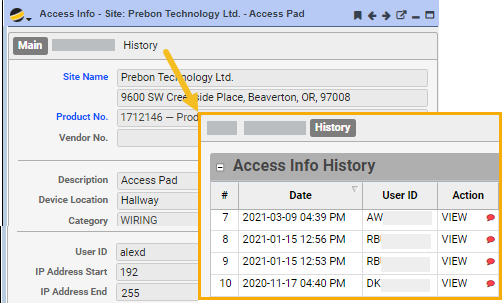
Compartmentalize key information to access your customer site. Keep the site access info secure, while tracking who accesses it, when, and actions taken (view, edit). For users with permission, easily access this information with one click, from the project or service call you are working on.
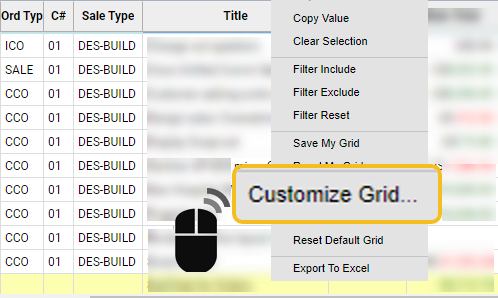
For more information about Q360 version 21.01, see the release notes.
See next What’s New v21.02.